Best LinkedIn Captions for Event Attendees to Post: The Biggest Driver of Share Rates
LinkedIn captions for events are the short texts attendees, speakers and sponsors post with their event graphic; the ones people actually post are personal, name the event and date, and end with an invitation to meet.
Creating a branded event graphic with Go Spread is quick. Writing a good LinkedIn caption is where most people get stuck. That asymmetry is why, in our experience, the caption is the single most important factor in whether attendees actually share their graphics.
Without a pre-written caption, the typical journey looks like this: the attendee downloads a beautiful graphic, opens LinkedIn, stares at the empty text field, thinks "I will post this later," and never does. The graphic sits in the camera roll forever.
With pre-written captions and one-click copy, the journey becomes: download graphic, copy caption, paste into LinkedIn, post. Or, even shorter, post straight from the event page with the caption already filled in. The whole thing takes about a minute, which is why prepared captions get so many more attendees to actually post. They are one of the core tactics in our guide on getting attendees sharing on LinkedIn without paid ads.

Anatomy of Effective LinkedIn Captions for Events
The Hook (First Line)
LinkedIn cuts posts off after the first couple of lines with a "See more" button. The first line has to be compelling enough to stop the scroll and earn that click. Hooks that work well:
"Excited to announce: I will be at [Event] this [Month]!"
"Who else is heading to [Event]?"
"[Topic] is evolving fast. That is why I am joining [Event]."
"Mark your calendar: [Event] is coming up and I will be there."
The Body (Context and Value)
The body explains why the event matters and what the poster hopes to gain or contribute. Keep it to two or three sentences:
Mention specific topics, speakers or sessions
Share a personal reason for attending
Reference a professional goal connected to the event
The CTA (Engagement Driver)
End with a question or call to action that invites people to respond:
"Who else is going? Drop a comment!"
"DM me if you want to meet up."
"What sessions are you most excited about?"
"Tag someone who should join!"
Hashtags
Include three relevant hashtags: the event's official hashtag, an industry-specific one and a general professional one for discoverability.
5 Best LinkedIn Captions for Events Templates & Share Cards
Template 1: The Excited Announcement
"I am thrilled to announce that I will be at [Event] on [Date] in [City]. Looking forward to connecting with fellow professionals and digging into [Topic]. Who else is going? Let me know in the comments! #EventName #Industry #Networking"
Template 2: The Networking Invitation
"[Event] is just [X] weeks away and I cannot wait. If you are attending too, let's connect beforehand. I am particularly interested in discussing [Topic]. DM me or drop a comment if you want to meet! #EventName #Networking #Industry"
Template 3: The Topic-Focused Hook
"[Topic] is changing faster than ever. That is exactly why I am joining [Event] on [Date]. The speaker lineup is impressive, and I am especially looking forward to the session on [Specific Topic]. Who else is interested in [Topic]? #EventName #Topic #ProfessionalDevelopment"
Template 4: The FOMO Creator
"Only [X] weeks until [Event] in [City]. The lineup this year is outstanding. If you have not registered yet, I highly recommend checking it out. See you there? #EventName #Industry #MustAttend"
Template 5: The Direct CTA
"I will be at [Event] on [Date]. Looking to connect with professionals working in [Area]. If you are attending, send me a message. Let's make the most of the event. #EventName #Networking #Industry"
Generate Your Own LinkedIn Caption for Your Event
Want a caption that fits your role and tone instead of a fixed template? Our free LinkedIn caption generator for events writes ready-to-post captions for attendees, speakers, sponsors, exhibitors and organizer teams. Pick your role, choose a professional, enthusiastic or casual tone, add the event name, date, location and hashtag, then copy the caption with one click.
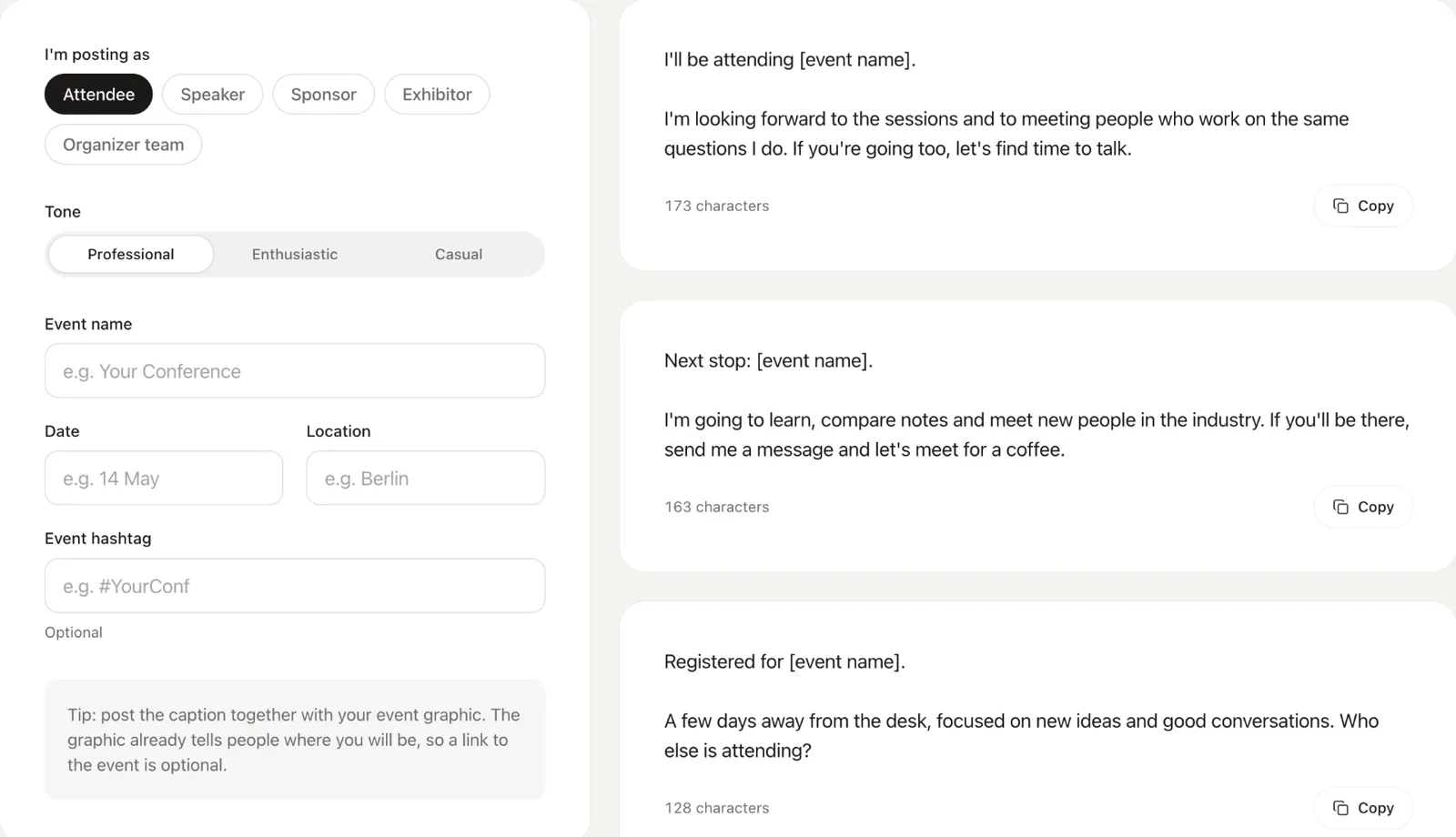
Speakers who also need a graphic to go with their caption can make one with the free speaker card generator.
LinkedIn Captions for Events: Tone Variations
Different attendees have different communication styles. Offering a few tones lets each person find one that feels authentic:
Casual and Enthusiastic
Best for startup events, community gatherings and creative conferences. These captions use exclamation marks, emojis (sparingly) and conversational language.
Professional and Understated
Best for corporate events, leadership summits and industry conferences. Measured language, with the focus on professional growth and learning.
Topic-Expert
Best for specialized conferences and technical events. These captions reference specific topics, trends or challenges, which positions the poster as knowledgeable in their field.
Networking-Focused
Best for any event type. They explicitly invite connections and meetings, which makes the post interactive and gets people commenting.
Go Spread: One-Click LinkedIn Captions for Events
Go Spread builds captions directly into the graphic creation workflow. Once attendees have created their branded graphic, they see the captions the organizer prepared and can copy one with a single click, or post the graphic straight to LinkedIn with the caption.
How LinkedIn Captions for Events Work in Go Spread
The organizer writes a few captions for each graphic during setup
The attendee creates their graphic (upload photo, choose graphic)
The attendee sees the available captions next to their graphic
One click copies the selected caption to the clipboard, or posts graphic and caption directly to LinkedIn
For a manual post, the attendee pastes the caption into LinkedIn alongside the downloaded graphic
Because the words arrive at the exact moment the graphic does, we see far more people follow through than when they have to write the post themselves.
LinkedIn Captions for Events: Speaker Variants
Speakers need different content than attendees. For the graphic side of speaker promotion, see our guide to speaker visuals that let speakers post on LinkedIn.
Talk Announcement
"I am honored to be speaking at [Event] on [Date]. My session will cover [Talk Title]. If you are interested in [Topic], I would love to see you there and continue the conversation. #EventName #Speaking #Topic"
Expertise Positioning
"After years of working on [Topic], I am excited to share my insights at [Event]. Join me on [Date] for a closer look at [Specific Aspect]. Questions welcome! #EventName #ThoughtLeadership #Topic"
Community Building
"Speaking at [Event] is always a highlight. The community around [Topic] is incredible. If you are attending, let's connect before, during, or after. #EventName #Community #Industry"
LinkedIn Captions for Events: Sponsor Variants
Sponsors need captions that balance event promotion with brand visibility:
Sponsor Presence
"[Company] is proud to be a sponsor of [Event]. Join us at our booth to learn about [Product/Service]. Looking forward to great conversations! #EventName #Sponsor #Industry"
Sponsor Invitation
"We are sponsoring [Event] because we believe in [Mission/Community]. If you are attending, stop by and say hello. We have some exciting things to share. #EventName #Sponsor"
Common Mistakes in LinkedIn Captions for Events
Mistake 1: Too Long
Captions that run past five sentences get truncated and read like essays. Keep it concise: two to four sentences plus hashtags.
Mistake 2: No CTA
Without a question or call to action, a caption collects fewer comments. Always end with an invitation to interact.
Mistake 3: Too Generic
"Looking forward to this event" is not a LinkedIn caption. Good captions mention specific topics, speakers or goals that give the post substance.
Mistake 4: Excessive Hashtags
A wall of hashtags looks spammy. Stick to three to five relevant, targeted ones.
Mistake 5: No Pre-Written Options
Expecting attendees to write their own captions is the single biggest mistake. Pre-written captions with one-click copy are essential, and they belong in every step of the organic playbook for promoting an event on LinkedIn.
Measuring LinkedIn Captions for Events Effectiveness
Go Spread does not read your attendees' LinkedIn posts, but its analytics show what you need to judge whether your captions work:
Views and downloads per graphic, and the conversion between them
Direct LinkedIn posts made from the event page
Estimated impressions per graphic
Performance per graphic, so you can compare variants with different captions
Get Started with LinkedIn Captions for Events
Create branded graphics with pre-written captions when you start free with Go Spread. The free plan lets you test the whole flow, no credit card needed.
Contact the Go Spread team for help with the caption strategy for your event.